Chrome extension for small federal contractors

Bid or no-bid, in about a minute.

Open any contract opportunity on SAM.gov. GovVerdict reads the notice and its attachments, checks them against your company profile, and gives you a clear verdict with the reasons.

Add to Chrome, it’s freeSee how it works
5 free analyses a dayNo account neededReads PDFs and Word files
Four possible answers

A verdict you can act on

Bid

Eligible, strong fit, and enough time to respond.

Consider

Eligible, but with gaps or risks to resolve first.

No-bid

Ineligible, missing a mandatory qualification, or a poor fit.

Respond

Sources sought or presolicitation: send a capability statement, not a proposal.

How it works

Three steps, about a minute

Set up your company once

NAICS codes, certifications, the states you work in, capabilities and past performance. Stored in your Chrome profile.

Open a SAM.gov opportunity

GovVerdict picks up the notice in the side panel and pre-selects the attachments worth reading.

Click Analyze

Get the verdict, a fit score, the offer checklist, red flags and questions for the contracting officer.

Features

Built for the bid/no-bid call

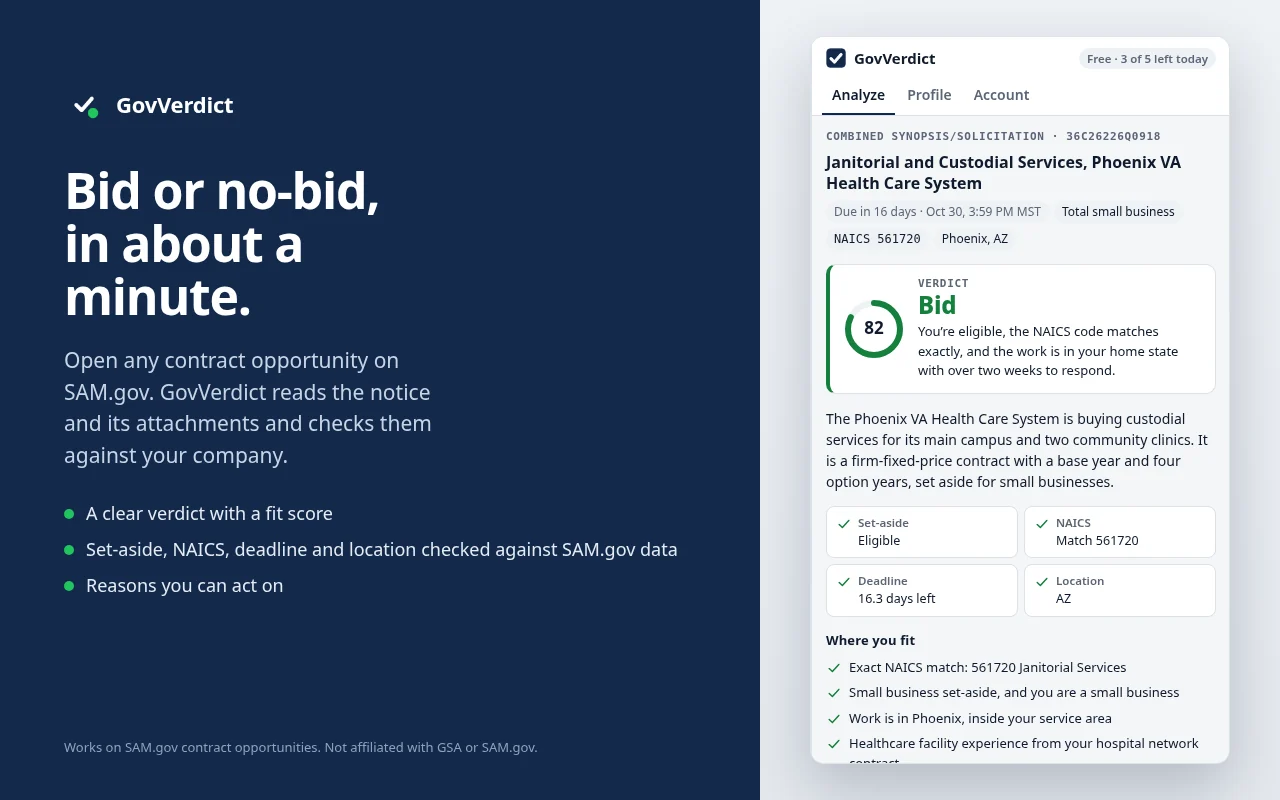
Bid or no-bid, in about a minute.

Open any contract opportunity on SAM.gov. GovVerdict reads the notice and its attachments and checks them against your company.

  • A clear verdict with a fit score
  • Set-aside, NAICS, deadline and location checked against SAM.gov data
  • Reasons you can act on
Bid or no-bid, in about a minute. GovVerdict side panel screenshot

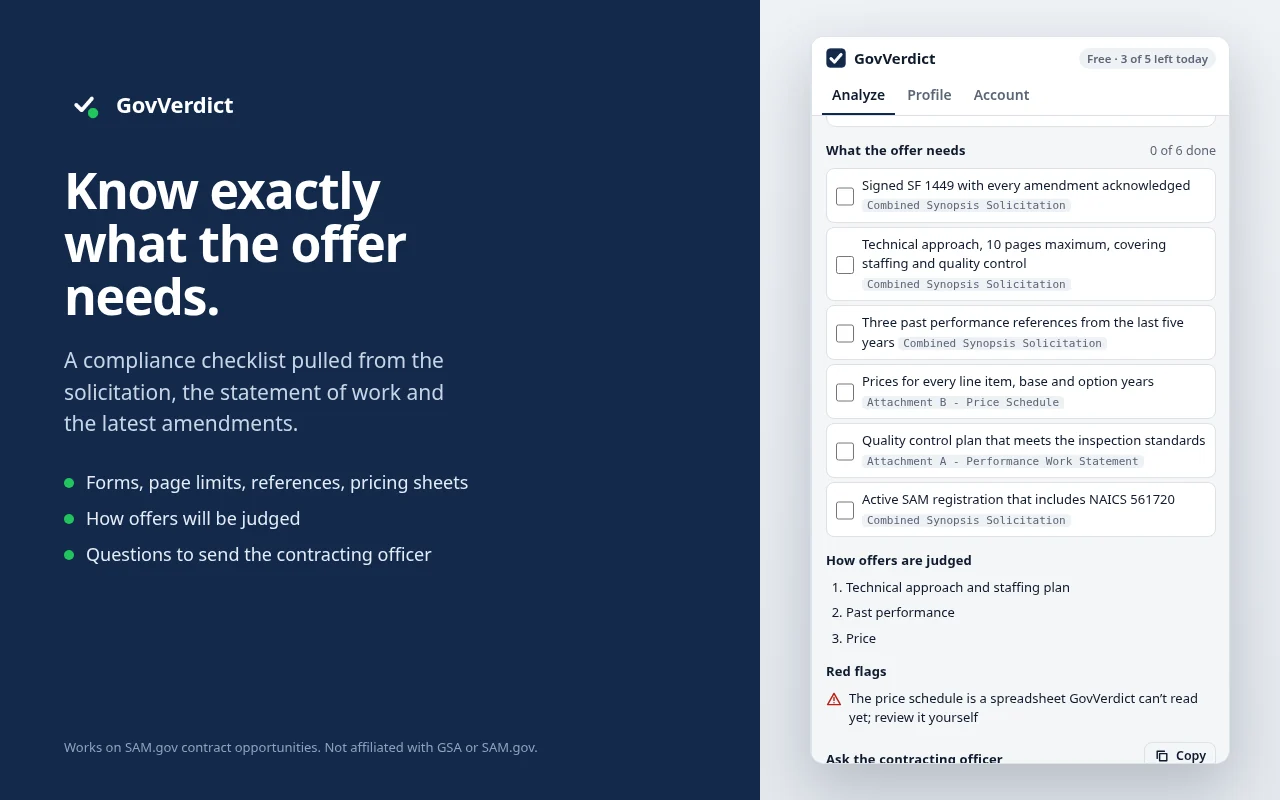
Know exactly what the offer needs.

A compliance checklist pulled from the solicitation, the statement of work and the latest amendments.

  • Forms, page limits, references, pricing sheets
  • How offers will be judged
  • Questions to send the contracting officer
Know exactly what the offer needs. GovVerdict side panel screenshot

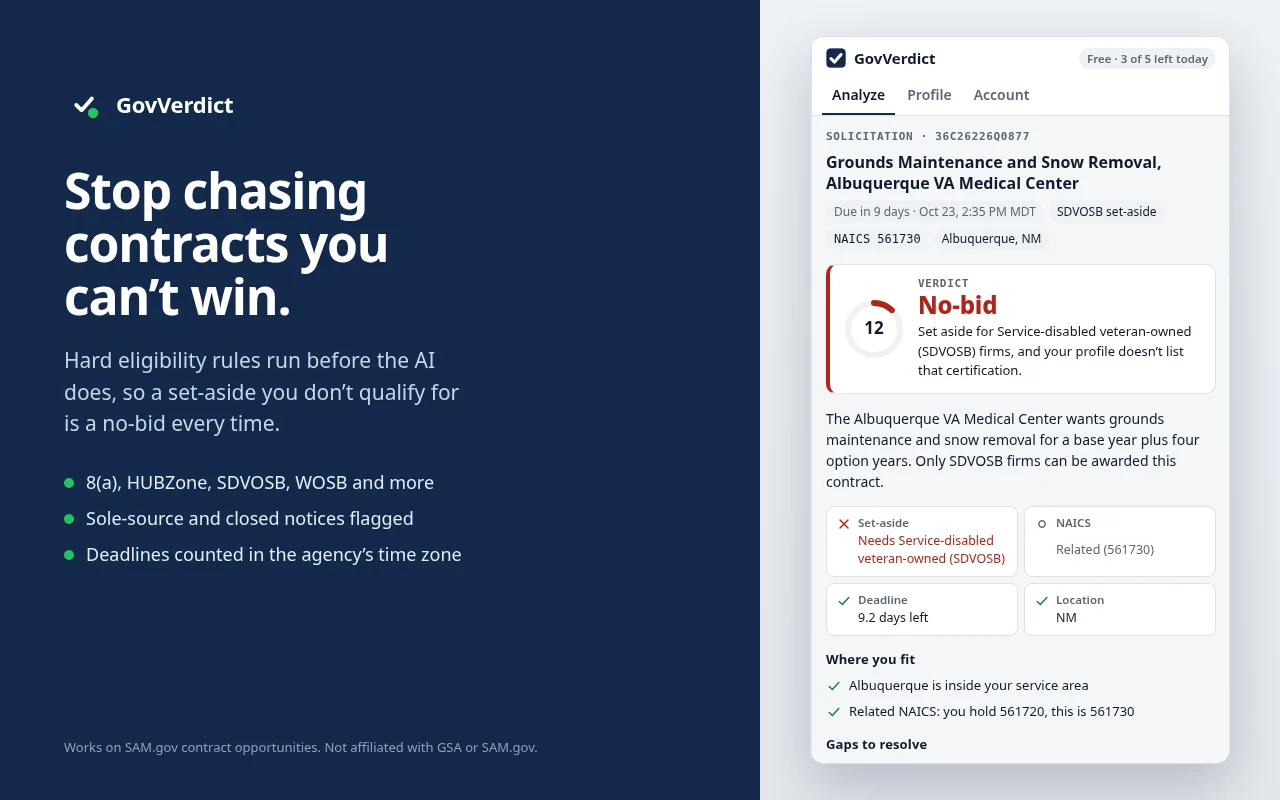
Stop chasing contracts you can’t win.

Hard eligibility rules run before the AI does, so a set-aside you don’t qualify for is a no-bid every time.

  • 8(a), HUBZone, SDVOSB, WOSB and more
  • Sole-source and closed notices flagged
  • Deadlines counted in the agency’s time zone
Stop chasing contracts you can’t win. GovVerdict side panel screenshot

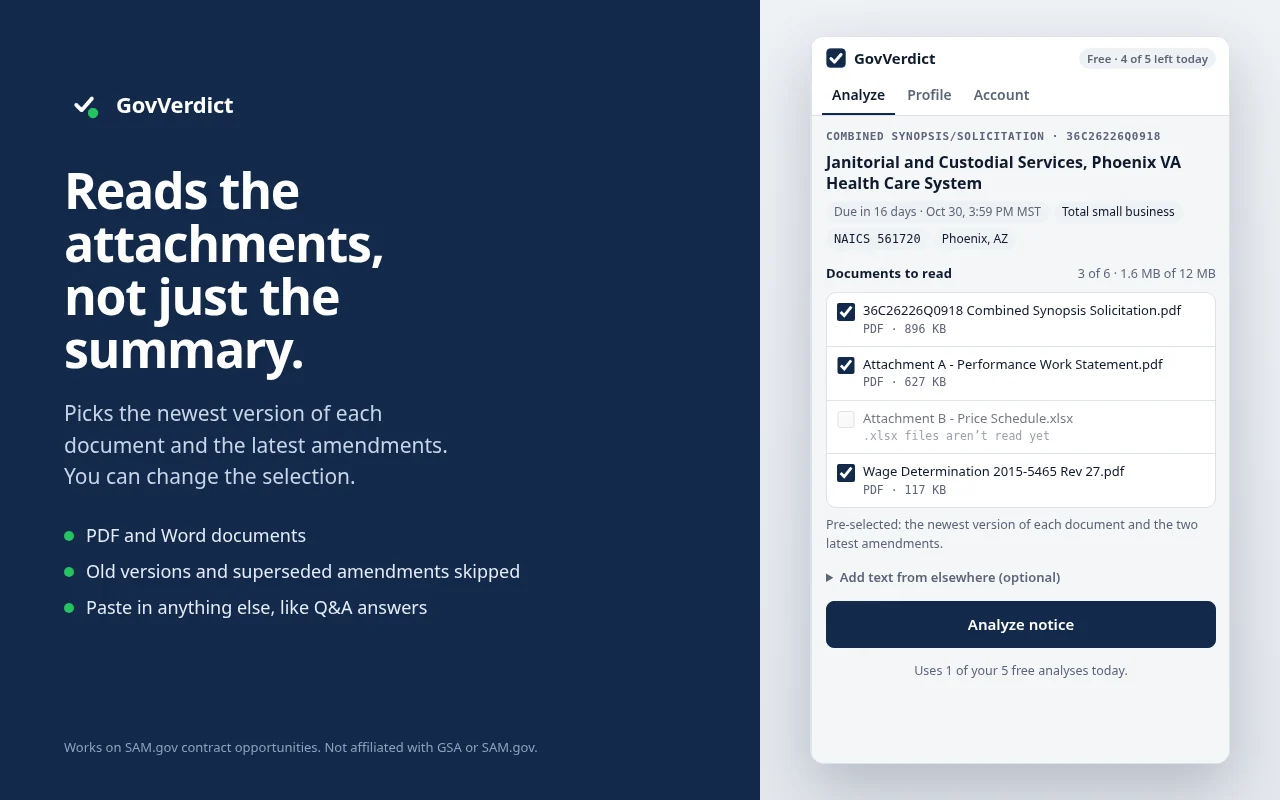
Reads the attachments, not just the summary.

Picks the newest version of each document and the latest amendments. You can change the selection.

  • PDF and Word documents
  • Old versions and superseded amendments skipped
  • Paste in anything else, like Q&A answers
Reads the attachments, not just the summary. GovVerdict side panel screenshot

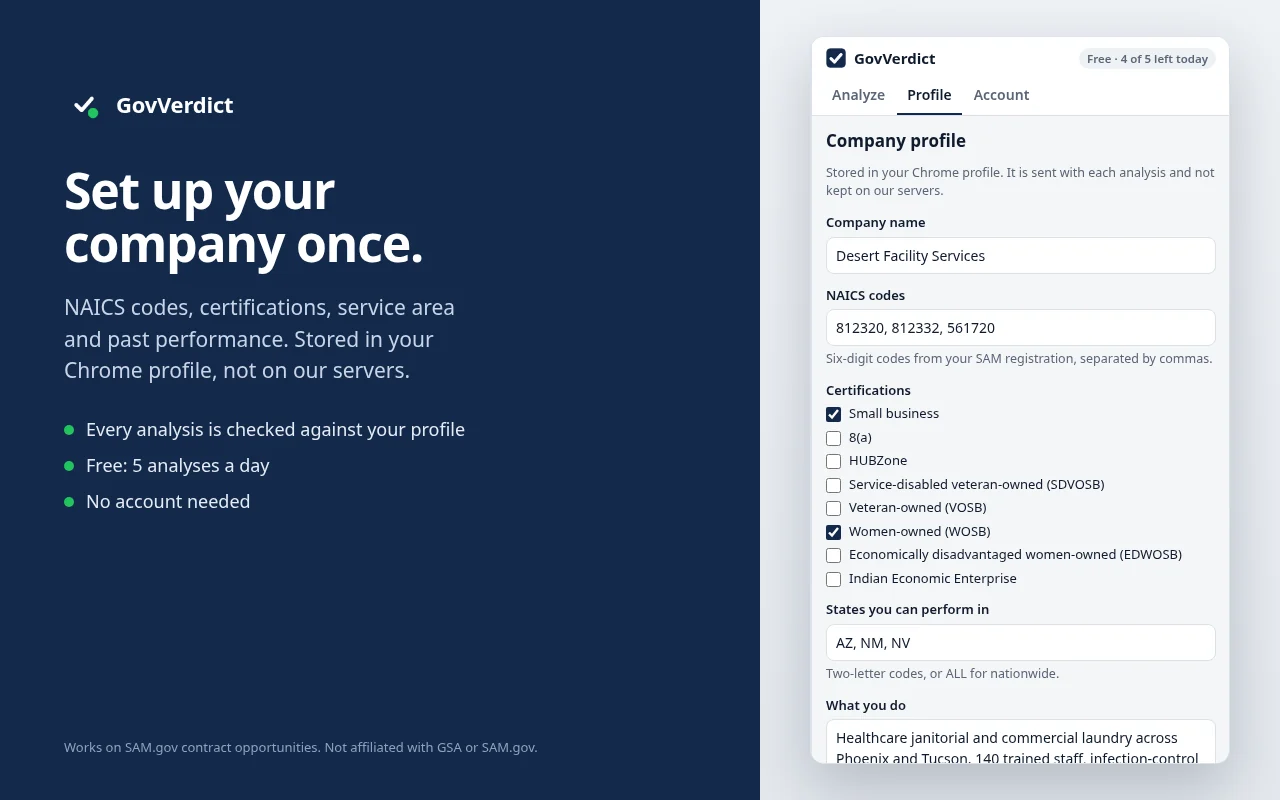
Set up your company once.

NAICS codes, certifications, service area and past performance. Stored in your Chrome profile, not on our servers.

  • Every analysis is checked against your profile
  • Free: 5 analyses a day
  • No account needed
Set up your company once. GovVerdict side panel screenshot
In every analysis

Everything you need to decide

VerdictBid, Consider, No-bid, or Respond for sources sought and presolicitations.
Fit scoreFrom 0 to 100, with the reasons behind it.
Eligibility checksSet-aside, NAICS match, response deadline and place of performance, from SAM.gov data.
Key factsContract type, period of performance, incumbent, site visit, wage determination.
Offer checklistWhat the offer must include, with the document each item came from.
Evaluation and risksHow offers will be judged, red flags, and questions for the contracting officer.
One-click summaryPaste it into an email or your pipeline tracker.
Pricing

Start free

Free
$0
  • 5 analyses a day
  • All checks and the full analysis
  • No account or card needed
Pro
$14 a month
  • Up to 60 analyses a day
  • Deeper model for long solicitations
  • Use on up to three browsers
  • Cancel any time

Coming soon. Upgrades will be available from the Account tab in the extension.

Privacy

Only what the analysis needs

GovVerdict only runs on sam.gov. Here is everything we collect; the privacy policy has the details.

Website contentThe notice and attachments you analyse. Not stored after the analysis.
LocationA one-way hash of your IP address for the daily limit. Deleted after about 3 days.
Personal informationPro only: your checkout email, to link your licence.
Payment informationPro only: subscription status. We never see card numbers.
FAQ

Questions

Which pages does it work on?

Contract opportunity pages on SAM.gov, the ones whose address looks like sam.gov/opp/…/view. On any other page the panel asks you to open one.

Which attachments can it read?

PDF and Word files up to 7 MB each and 12 MB in total. Spreadsheets aren’t read yet; paste the part you need into “Add text from elsewhere”.

Is my company profile uploaded?

It’s stored in your Chrome profile and sent with each analysis, then discarded. We don’t keep it on our servers.

Can I trust the verdict?

Eligibility rules (set-aside, deadline, sole source) are checked deterministically and always win. The rest is AI analysis of the documents, so treat it as decision support and confirm in the solicitation.

Is this an official government tool?

No. GovVerdict is independent and isn’t affiliated with or endorsed by GSA, SAM.gov or any U.S. government agency.

More answers on the support page.

Stop reading solicitations you can’t win.

Let GovVerdict read the notice and attachments first, and spend your time on the bids worth writing.

Add to Chrome, it’s free